Lyrics
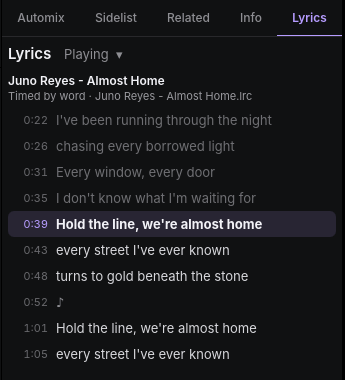
openDJ shows the lyrics of the track playing in the Lyrics tab of the side panel (next to Info). When the lyrics are timed, the line being sung is lit and kept in view, and clicking a line plays the deck from there.
Where lyrics come from
openDJ reads lyrics you already have. It looks for them in this order:
- An
.lrcfile beside the track, with the same name:Song.lrc(orSong.mp3.lrc) next toSong.mp3. Tools such as LRCGET write these. Plain LRC gives a time for each line; enhanced LRC, with a time before each word (<00:10.40>the), gives a time for each word. - The track's tags: timed lyrics in an MP3's
SYLTframe, and lyrics inUSLT(MP3),LYRICS(FLAC and Ogg) and©lyr(M4A). Lyrics in these that are written as LRC are read as timed.
openDJ never fetches or sends lyrics on its own. To look them up online, see Find lyrics online.
What the tab follows
The menu beside Lyrics picks the track:
- Playing track (the default): the deck playing, staying with it while it plays. When nothing plays, the deck played last, or the first deck with a track.
- Selected track: the track selected in the browser. Its line is lit when it is also on a deck.
- Deck A or Deck B.
Under the track's name the tab says how the lyrics are timed (by word, by line, or not timed) and where they came from.
In Player mode
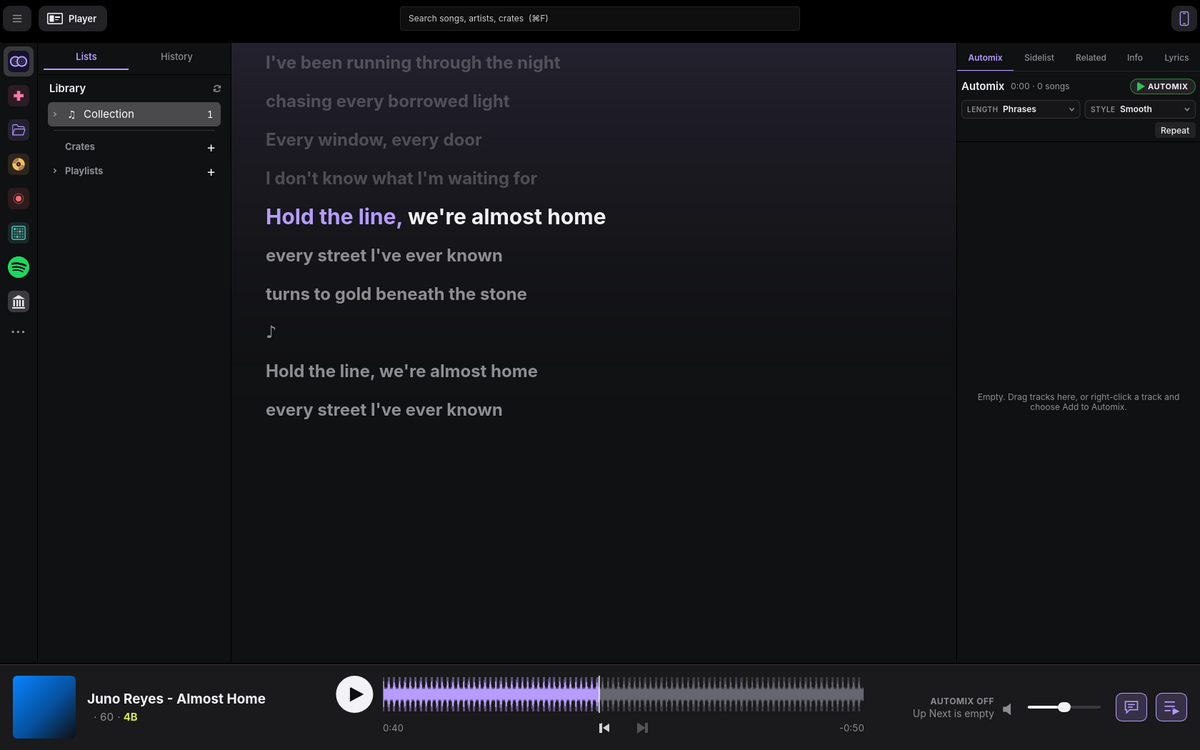
The speech bubble button on the Player bar opens Now Playing on its Lyrics: the lyrics of the track playing large, beside its album art. The line being sung is big and white, and when the lyrics are timed by word, the words already sung turn lilac. Lines gone by fade, and a ♪ marks a break in the singing. Click a line to play from it. Press the button again, or the ⌄ at the top left, to go back to the list.
On the waveforms
When a track on a deck has timed lyrics, they run along the bottom of its big waveform, scrolling with the audio, so you can see where the singing is and what comes next while you mix. Each word sits at the moment it is sung, on a faint strip for its line. The word being sung is lit and fills with lilac, and words already sung stay lilac. Lyrics timed only by line have their words spread over the line by length; Time words places them exactly. Turn this off in Settings › Decks › Lyrics on waveforms.

Time words
Lyrics timed only by line (most of what LRCLIB has) light a whole line at once. Time Words, under the track's name in the Lyrics tab, gives each word its own time, so words fill as they are sung on the karaoke screen, in Player mode and on the waveforms.
openDJ listens to the track's vocals with Whisper, on your computer:
nothing is sent anywhere. It separates the vocals first if the track has
no stems yet, then lines up the lyrics you have with the words it hears.
Words it can't make out are placed between those it can. The lyrics are
saved as an .lrc beside the track, timed by word.
The first time, openDJ downloads the Whisper model (about 550 MB). A track takes a minute or so on a recent Mac. If Whisper can't make out enough of the words, say for a track sung in a heavy mix or lyrics for another version, the lyrics are left as they were and the tab says so.
Transcribe
A track with no lyrics at all shows Transcribe in the Lyrics tab.
openDJ listens the same way and writes down the words it hears, timed by
word and split into lines at the pauses. They are saved as an .lrc
beside the track, and the tab says Transcribed by openDJ, since words
heard by ear can be wrong. Find or your own .lrc can replace them at
any time.
Karaoke screen
Karaoke in the Lyrics tab (or Karaoke Screen at the top right of Player mode's lyrics) opens the lyrics in a window of their own, for a TV, a projector or a second display. When another display is connected, the window opens full screen there. Double-click it, or press F, to switch full screen on or off; Esc leaves full screen. Close it with Karaoke again, or its window's close button.
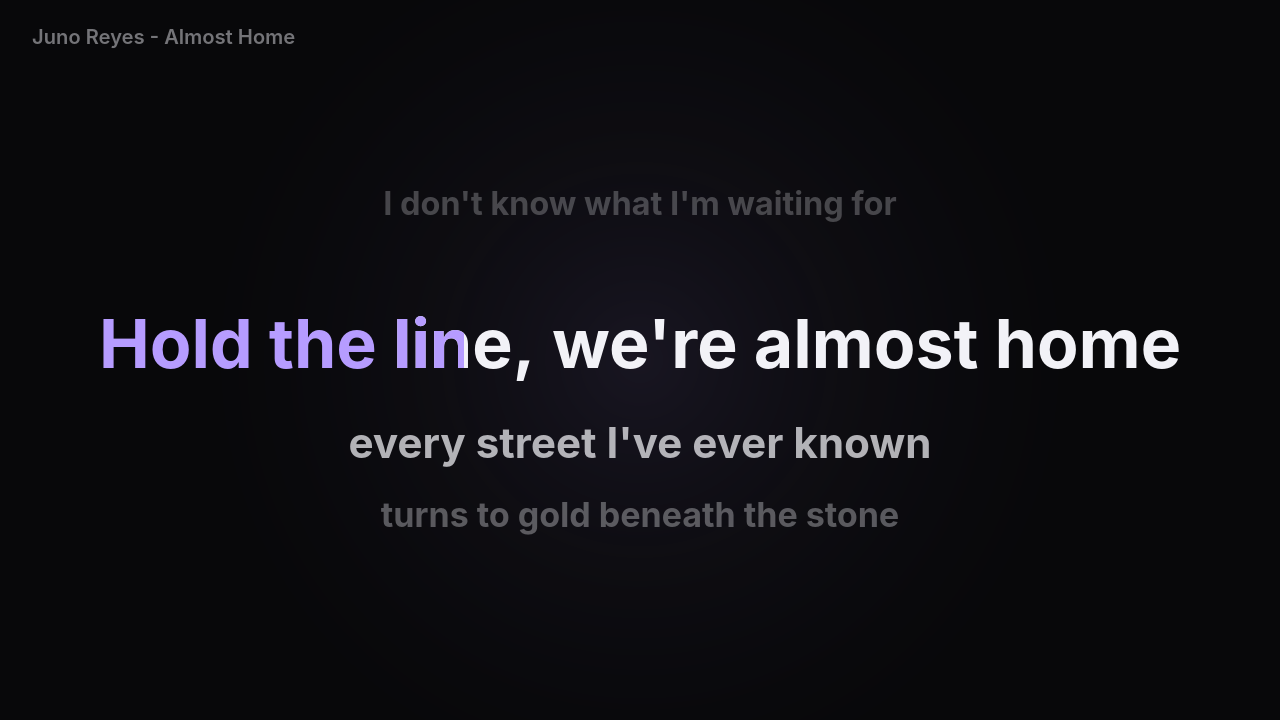
The line to sing is big in the middle, with the line before it faded above and the next two lines below. The word being sung fills with lilac as it is sung. Lyrics timed only by line have their words spread over the line by length, so the fill is close but not exact; lyrics timed by word fill word for word. After a break in the singing, the next line shows early, with dots above it counting in the last four beats at the deck's tempo.
Like Player mode's lyrics, the screen follows the track playing, so it moves over with Automix. While it is open, the Lyrics tab follows the track playing too.
On a TV or another device
The karaoke screen can also be a web page, for a smart TV's browser, a
tablet, or a laptop plugged into a projector. With the karaoke screen open,
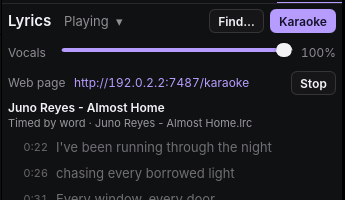
press Share beside Web page in the Lyrics tab. The tab shows the
page's address, such as http://192.168.1.20:7487/karaoke: open it in a
browser on any device on the same network. The page shows the same lines,
word fill and count-in as the window, and keeps time itself between
updates. Stop takes it off the network; closing the karaoke screen
stops it too. openDJ remembers whether you shared it.
Turning the voice down
While the karaoke screen is open, the Lyrics tab has a Vocals slider: the level of the vocal stem on the deck the screen follows, from none on the left to full on the right. Leave a little in as a guide for singers, or take it all out. The level you set is kept for the next track the screen follows, so a whole night can run with the voice down. Stems are separated when a track loads, and the slider works once they are ready.
Find lyrics online
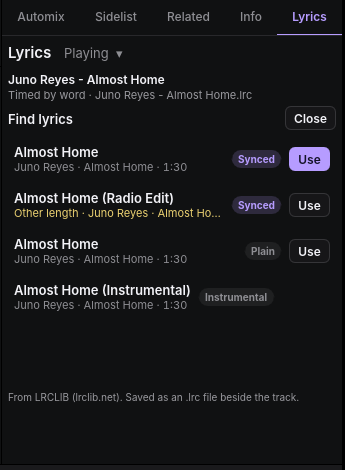
openDJ can look a track up on LRCLIB, a free
community database of synced lyrics. Press Find… in the Lyrics tab. openDJ asks LRCLIB for the track by
its artist, title, album and length, and lists what it has, best first:
synced lyrics of the same length at the top. Other length marks lyrics
for another version of the track (a radio edit, say), whose timing won't
fit. Use saves the lyrics as an .lrc file beside the track, where
other apps find them too. If the track's folder can't be written, openDJ
keeps them in its own settings folder instead.
Only the track's names and length are sent to LRCLIB, and only when you press Find. To stop openDJ asking LRCLIB at all, turn off Find lyrics online in Settings › Collection › Health.